Join Lock
RaidProtect's Join Lock feature closes access to new arrivals on the server until you disable it, surpassing Discord's native limitation which only allows this blocking for 24 hours via the "Pause joins" safety action.
🚦 Use cases and recommendations
- Private and closed servers: Join Lock is particularly recommended for servers that need to remain private and do not want any new arrivals (company servers, restricted teams, private groups).
- Staff servers: For servers dedicated to the moderation or administration team, where only authorized members should have access.
- Corporate or professional servers: For organizations that use Discord internally and want to ensure that only current employees can access the server.
- Limited-size communities: For servers that have reached their desired maximum size and no longer want to accept new members permanently.
❓ How Join Lock works
As long as Join Lock is active, RaidProtect applies to newcomers the action during the raid you chose for Auto RaidMode. Unlike Discord's native feature which requires manual renewal every 24 hours, the blocking lasts without intervention until you disable it.
| Action during the raid | Join Lock effect |
|---|---|
| "Lock invites" (default) | The server's invites are disabled: no one new gets in. |
| "Kick everyone arriving" (Premium) | Each newcomer is kicked and receives a private message telling them joins are closed. |
| "Send to the captcha" | Newcomers can enter after solving the captcha: the server is therefore not closed. |
| "Captcha frozen during the raid" | Newcomers wait behind the captcha as long as Join Lock is active. |
For a server that must stay truly closed, choose "Lock invites", "Kick everyone arriving" or "Captcha frozen during the raid". With "Send to the captcha", Join Lock merely imposes the captcha on newcomers.
Members already present on the server remain active and can continue to use the server normally. The welcome message stays silent as long as Join Lock is active.
With the "Lock invites" action, Discord's community features are essential for Join Lock. Follow our guide to verify that community is enabled on your server. The other actions work without the community.
🚩 Join Lock configuration
Use the command: /joinlock [status]
- Without options, the command displays Join Lock's status with an "Enable" or "Disable" button.
- Replace
[status]with True to enable it or False to disable it directly.
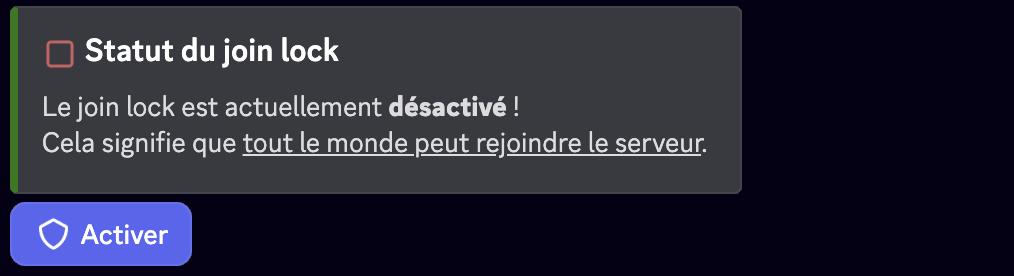
The command requires the Manage Server permission, and a message is posted in the logs channel on every state change.
The joinlock command is usable via prefix. As long as Join Lock is active, the /raidmode command is unavailable: disable Join Lock first.
Frequently asked questions
What is the difference with raid mode?
Raid mode is temporary (24 hours at most) and can turn itself on during a wave. Join Lock is enabled by hand and stays in place until you disable it.
Does Discord Community need to be enabled?
Only if Auto RaidMode's action during the raid is "Lock invites". With the other actions, Join Lock works without the community.
Can new members still get in?
Not with "Lock invites", "Kick everyone arriving" or "Captcha frozen during the raid". With "Send to the captcha", they enter after solving the captcha.
