DM Lock

 Arthur
 Dawoox
 Ichiifriend
 Zallom
 user28471
RaidProtect's DM Lock feature allows you to permanently close access to direct messages (DMs) sent from the server, surpassing Discord's native limitation which only allows this blocking for 24 hours via the "Pause DMs" security action.
🚦 Use cases and recommendations
- Servers exposed to spam or harassment: DM Lock is particularly recommended for public or large-audience communities, where the risk of DM abuse is higher.
- Temporary events or sensitive periods: During launches, important announcements, or periods of high traffic (e.g., contests, promotions), enabling DM Lock helps prevent phishing or scam attempts.
- Communities with a young audience: For servers with a large number of minors, restricting DMs can strengthen security and prevent inappropriate behavior.
- Continuous protection: Thanks to automation, there is no vulnerability window caused by forgetting the manual renewal.
❓ How DM Lock works
The RaidProtect bot regularly checks the status of the server DM blocking setting and, if necessary, automatically re-enables it to avoid any vulnerability period between two manual renewals. This task runs transparently for administrators and server members.
It remains possible to send and receive messages with:
- friends
- bots
- staff
Discord's community features are essential for DM Lock to work properly. Follow our guide to verify that community is enabled on your server.
🚩 DM Lock configuration
- Run the
/settingscommand. - Click the "DM Lock" button.
- Enable or disable the automatic closure of direct messages.
 DM Lock state
ℹ️ /dmlock-info command
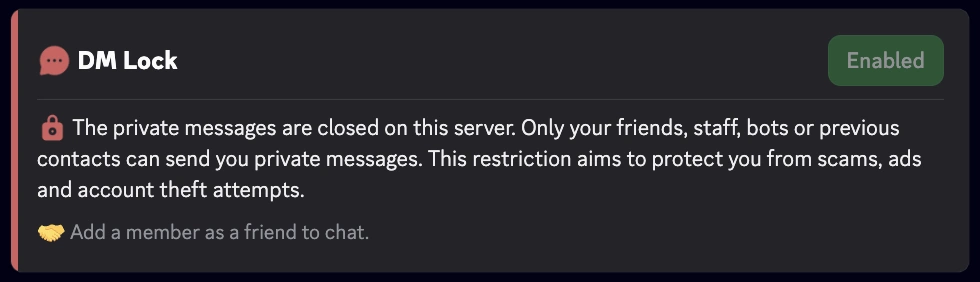
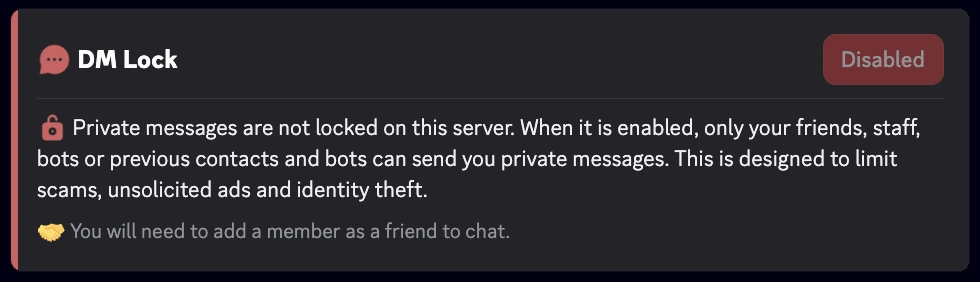
The /dmlock-info command lets you inform members about the current status of DM Lock on the server. It displays a clear message indicating whether the restriction is enabled or disabled, along with an educational explanation of its purpose.
Objective:
- Explain why DMs are restricted (fighting spam, scams, phishing).
- Reduce confusion and recurring questions from new members.
- Remind members of the conditions for continuing to chat via DMs (friends, staff, bots, previous contacts).
Display example
- Enabled
- Disabled
⚙️ Best practices
- Encourage active members to use
/dmlock-infoto answer new members' questions. - Post it regularly or pin it in your welcome channels.
- Combine it with your rules or announcements to remind members of the server's anti-spam policy.
